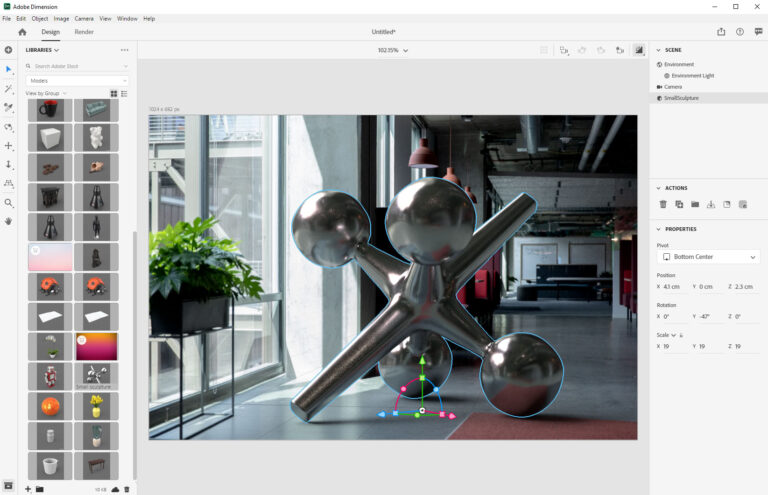

Visual communication today often relies on photorealistic imagery. Adobe Dimension was designed for those who want to create high-quality 3D visualizations quickly and easily—packaging, product photos, or marketing materials, without needing in-depth 3D knowledge.
What is Adobe Dimension?
Adobe Dimension is an easy-to-use 3D design and rendering software available as part of Adobe Creative Cloud. It is not intended to replace full-scale 3D modeling (such as Blender or Cinema 4D), but rather to quickly assemble and render photorealistic compositions. The focus is on visualization and a simple, creative workflow.
Who is it for?
Adobe Dimension is especially valuable for the following user groups:
- Marketers and brand professionals who create product visualizations and advertising mockups.
- Graphic designers who want to place their existing 2D graphics in a 3D environment.
- Advertising agencies and studios, where fast iteration and impressive presentations are important.
- Product designers who want lifelike visual prototypes in a short amount of time.
Key features and benefits
Adobe Dimension’s key strengths:
- Photorealistic rendering: using realistic lighting and shadow effects, material reflections, and physically based materials (PBR).
- Real-time preview: every change is reflected quickly, resulting in a short iteration cycle.
- Easy-to-use interface: no in-depth 3D expertise is required to work effectively.
- Creative Cloud integration: seamless import and use of Photoshop and Illustrator files.
- Built-in materials and model library: readily available templates and textures help streamline your work.
What does a typical workflow look like?
The Adobe Dimension workflow is logically structured, and most individual tasks are streamlined:
- Import: loading 3D models (OBJ, FBX, STL, etc.) and 2D graphics.
- Materials: applying textures and PBR materials to surfaces.
- Lighting: setting up HDRI maps and directional lights to achieve a photorealistic effect.
- Camera and framing: determining the composition and camera settings according to the visual message.
- Render: exporting final images in high resolution for print or online use.
Tips for better results
Use good HDRI environment maps — a quality HDRI dramatically improves lighting and reflections. Don’t skimp on texture resolution, especially for packaging and close-ups. If you’re bringing graphics in from Photoshop, check that clipping masks (masks) and transparency are exported correctly.
Other useful tips:
- Set up the camera so the focal point is on the important details.
- Use multiple light sources for a more natural look.
- Use layered rendering (alpha, shadows, reflections) for flexibility in post-production in Photoshop.
How is it different from other 3D tools?
While tools like Blender or Cinema 4D offer complete modeling, animation, and simulation features, Adobe Dimension is a focused, visualization-oriented tool. It’s ideal for those who want to achieve a professional look quickly without taking on a learning curve that lasts several days.
Final thoughts
Adobe Dimension can be the perfect addition to a creative workflow, especially for projects where professional, photorealistic images need to be produced quickly and cost-effectively. Thanks to its Creative Cloud integration and user-friendly interface, it can easily be added to the toolkit of any marketing or design team.