Photoshop on the web is a versatile digital image editing and design application that we can access directly from a browser. Below, we’ll learn how to use it and how it differs from the desktop version.
Basic Editing Concepts
Layers
Layers are the foundation of almost every project in Photoshop on the web. They let us edit an image without damaging the original work.
Retouching
With Photoshop on the web, we can easily remove unwanted objects and imperfections from our images.
Selections
We can quickly select the parts of an image we want to edit, so we can work precisely in Photoshop on the web.
Adjustments
We can apply various adjustments in Photoshop on the web to change the appearance of images.
Access and Use
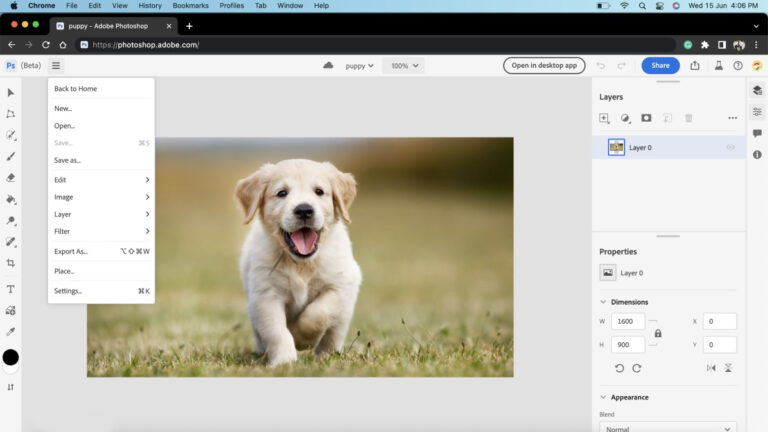
We can easily access Photoshop on the web through a browser. From the home page, we can open an existing document or create a new one.
Differences Compared to the Desktop Version
Although the web version doesn’t include all the features of the desktop version, the most commonly used image editing tools are available. Adobe continually adds features to the web version to make working even more efficient.
Frequently Asked Questions About Photoshop on the Web
Does Photoshop have a free online version? There is no free version of Photoshop on the web, but you can try Photoshop’s tools with the help of guided tutorials.
How much does the online version of Photoshop cost? Photoshop on the web is included in every Photoshop plan, and you can find purchase options on the Creative Cloud plans page.
Can I open .raw files in Photoshop on the web? Yes, Photoshop on the web supports .raw files, making them easy to edit.
Browser Support
Photoshop on the web is currently available in Google Chrome, Microsoft Edge (64-bit versions), and Firefox (desktop versions).
Summary
Photoshop on the web is a powerful online image-editing tool that makes it easy to access and unleash your creativity from any browser. Although it doesn’t include all the features of the desktop version, the web version can meet the needs of most users.
Adobe is continually developing and expanding the functionality of Photoshop on the web, so even more browser-based image-editing options can be expected in the future. For those who still need the desktop version’s unique features, switching to it is always an option.
Whether for professional work or personal projects, Photoshop on the web opens up the exciting world of digital image editing in your browser.